GTA 6 on PS5: PSN trouble on launch eve and firmware 14.23 now required
Hours before launch, PS5 players need to know two things. First: from the afternoon of November 18 (US time) PlayStation Network had sign-in trouble for hours, with logins blocked and games refusing to start: the official status page went back to green around 2:30 p.m. ET, but user reports stayed high into the evening. Second, and more important for midnight: Sony made PS5 system software 26.07-14.23.00 mandatory to launch GTA 6, and the game’s pre-load does not install it for you.
| Question | Answer |
|---|---|
| Does the PS5 need an update to play? | Yes, system software 26.07-14.23.00 |
| Does the GTA 6 pre-load download it? | No, it installs separately |
| How big is it? | About 1.2 GB, according to Notebookcheck |
| Is PSN working? | The status page went back to green the same day, but reports fell slowly |
| Did Sony explain the outage? | No, no cause was given |
Firmware 14.23: what to install before midnight
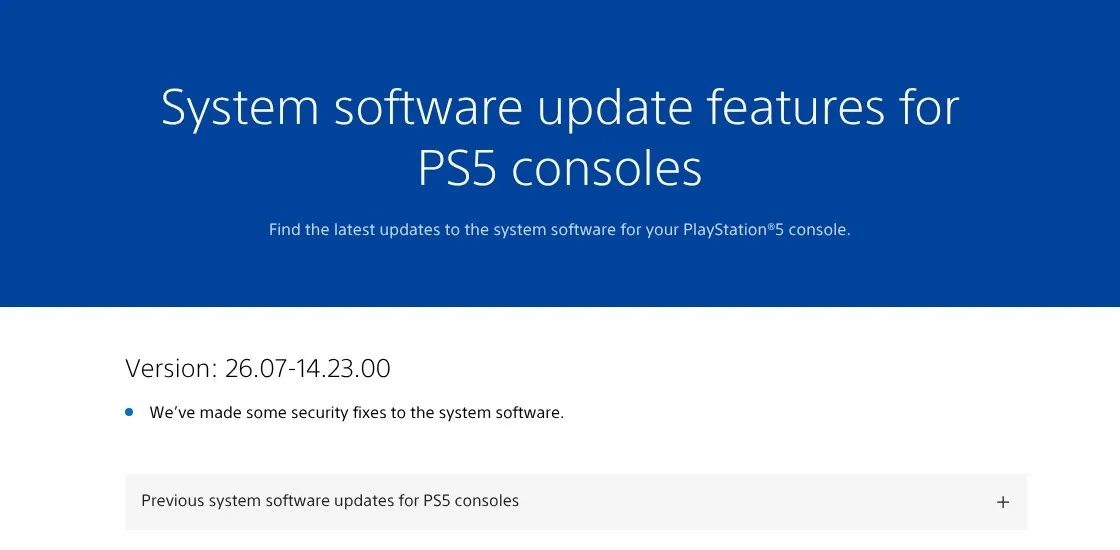
Not a word about GTA 6 in the official note: the link to the game came only from PlayStation Support’s post on X. Screenshot from the PlayStation PS5 system software page, November 18, 2026.
The key point is that the GTA 6 pre-load and the console update are two separate downloads. You can have the game installed in full with the latest patch and still be stuck at midnight if your PS5 is on the previous system version.
How to check and install it:
- Open Settings, then System.
- Go to System Software, then System Software Update and Settings.
- Pick Update System Software and, if 26.07-14.23.00 shows up, install it. The console restarts.
If automatic updates are on and the PS5 has been sitting in rest mode, it may have done this already: two minutes to check are worth it.
The November 18 PSN outage
The timeline comes from the press and Downdetector, so treat it as reported, with some differences between sources. Times are US Eastern, with Central European Time in brackets:
| Time ET (CET) | What happened | Source |
|---|---|---|
| around 1:00 p.m. (19:00) | About 876 Downdetector reports | Newsweek, Altchar |
| 1:50 p.m. (19:50) | Reports in Germany start to fall | Mein-MMO |
| 2:20 p.m. (20:20) | “Games and social” still red on the status page | Mein-MMO |
| 2:30 p.m. (20:30) | All services back to green on the status page | Mein-MMO |
| 2:32 p.m. (20:32) | Over 4,000 Downdetector reports | Newsweek |
| 3:05 p.m. (21:05) | Over 8,000 Downdetector reports, status page still green | GV Wire |
| 3:15 p.m. (21:15) | All services listed as normal on the status page | Newsweek |
| 5:00 p.m. (23:00) | Reports falling, problem not yet fixed for everyone | XDA Developers |
Players described the same symptoms: console connected to the internet but stuck at the PSN sign-in, with an error saying services are busy. Downdetector reports kept coming, and even grew, after the status page went green: over 8,000 around 3:05 p.m. ET according to GV Wire, while at 5:00 p.m. ET XDA said they were falling but some users were still stuck at sign-in. The numbers vary a lot between sources (Digit cites a peak of 1,753 reports in the US and 5,643 in the UK), and the green status page did not tell the whole story of the day.
Why you need PSN at midnight
The reason an outage like this is scary on launch night is simple: the digital licence is checked online at startup. If PlayStation Network does not respond, a digital copy of GTA 6 may refuse to start, even with the game fully installed (Mein-MMO, Notebookcheck). And on PS5 the boxed copy is a code anyway, so this applies to everyone.
There is a safety net, and it takes a minute to switch on: Console Sharing and Offline Play, under Settings, Users and Accounts, Other. With it enabled, your PS5 is your primary console and games you bought and downloaded start even without a connection. If you only use one console it is probably on already, but it is worth checking: our launch night checklist also covers the Xbox equivalent.
What to do before midnight
- Update the PS5 to 26.07-14.23.00 and make sure it is installed, not just downloaded.
- Check the game version: it should be at least 01.002.001.
- Turn on Console Sharing and Offline Play if you have not already.
- Leave the console on or in rest mode with automatic updates enabled: if another patch lands at midnight, you want it already downloaded.
- Check the PlayStation status page if the game will not start, before you uninstall or re-download anything.
When you can play in your country and how the unlock works is in our guide to GTA 6 unlock times.
Frequently asked questions
Is PS5 firmware 14.23 really required for GTA 6?
Yes. PlayStation Support said the system update is required before playing Grand Theft Auto VI. The full version number is 26.07-14.23.00.
Does the GTA 6 pre-load also install the PS5 update?
No. The game and the system software are two separate downloads: the firmware installs from Settings, System, System Software.
Is PSN working again?
Mostly. The PlayStation status page went back to green the same day, around 2:30 p.m. ET according to Mein-MMO and 3:15 p.m. ET according to Newsweek, but at 5:00 p.m. ET XDA still reported some users stuck at sign-in. Sony has not explained what happened.
Can I play GTA 6 if PSN goes down at midnight?
A digital copy needs its licence verified, so without PSN the game may not start. With Console Sharing and Offline Play enabled on your primary PS5, games you bought and downloaded start offline too.
In short
- Sony made PS5 firmware 26.07-14.23.00 mandatory to launch GTA 6: it installs separately, the pre-load is not enough.
- On November 18 PSN had sign-in trouble from around 1:00 p.m. ET: the status page went back to green around 2:30 p.m. ET, but reports only fell later in the day.
- Sony gave no cause for the outage, and the link to the GTA 6 launch remains a hypothesis.
- To be safe at midnight: updated firmware, game on 01.002.001 or later, and offline play enabled on your primary console.