How to save in GTA 6: slots, autosave and the mistake to avoid
Saving matters more in GTA 6 than in earlier entries, for one simple reason: at launch missions cannot be replayed. There is no replay menu, so an old save is the only way to see a mission again, do it better or go back to a moment in the story. How the first impressions found this out is in our news on missions you cannot replay; this is the practical side. The system itself is easy, but it has one detail that can cost you hours if you don’t know it.
In short
- How to save: pause menu (Options on PS5, Menu on Xbox), then Game and Save Game, and pick a slot.
- Slots: 15 manual saves plus one separate autosave.
- No saving during missions: the option is disabled, and in the prologue only autosave works.
- Watch out: loading an old manual save overwrites your autosave too.
- Cheats block saving until you restart the game.
How to save, step by step
Manual saving is done from the pause menu, anywhere in free roam. You do not need to go home or find a bed (KeenGamer).
- Press Options on PS5 or Menu on Xbox Series X|S to open the pause menu.
- Go to the Game section.
- Choose Save: the screen that opens is titled Game / Save (some guides call it Save Game).
- Select an empty slot, or an old one to overwrite.
KeenGamer adds a common-sense precaution: let the save finish before quitting to the main menu or closing the game.
Loading goes through the same menu: Game, then Load Game, and pick the autosave or one of your manual saves.
How many slots there are
| Type | How many | How it works |
|---|---|---|
| Manual | 15 | You choose them, and they are only overwritten if you decide to |
| Autosave | 1 | Updates on its own and always overwrites the previous one |
All three sources give the same count. The autosave has a slot of its own, so when it runs it does not touch your manual saves (Beebom). According to KeenGamer it triggers after missions and open-world events.
Each slot takes the name of the last mission you played and shows your story completion percentage, with date and time. From the same screen you overwrite a used slot with Cross or delete it with Square (PS5 buttons).
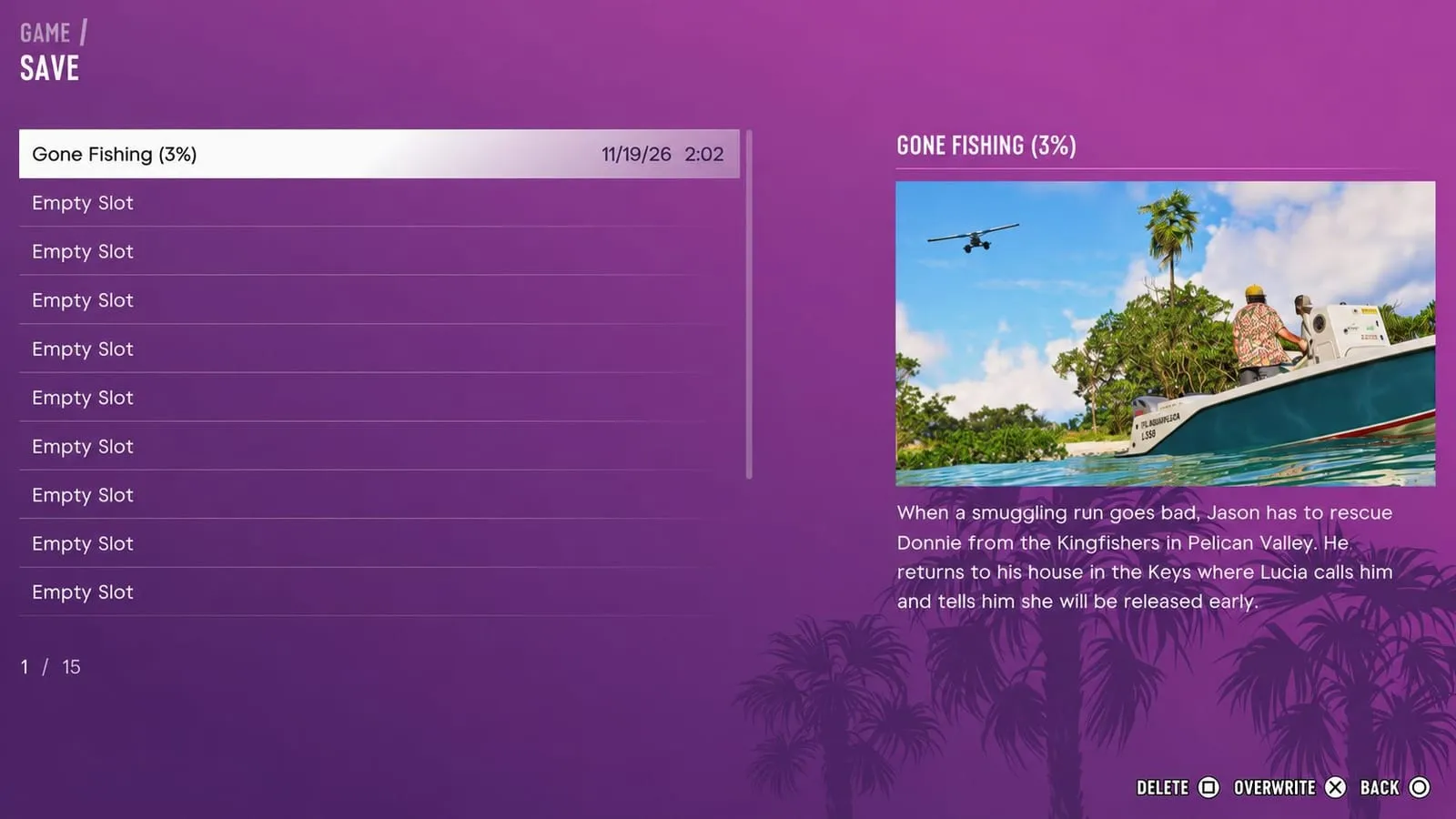
The save screen a few hours after launch: the slot is named after Gone Fishing, at 3% of the story, and the summary on the right has Jason going to rescue Donnie from the Kingfishers in Pelican Valley. In-game screenshot © Rockstar Games, via KeenGamer.
The mistake to avoid
That is why the autosave should be treated as a crash safety net, not as your main save (KeenGamer).
When you cannot save
- During missions. The save option is “usually greyed out” (PowerPyx), and manual saving stays blocked for the whole mission (KeenGamer, Beebom). Save before or after.
- In the prologue. According to KeenGamer, manual saving is disabled until the opening sequence ends and Jason reaches his house: until then there is only the autosave.
- With a cheat active. Any cheat, even a simple screen filter, blocks saving, trophies and achievements for the rest of the session: to save again you have to close the game completely and relaunch it (KeenGamer). The advice is to save before entering a code and always keep at least one clean save. Details are in our cheats guide.
How to use the 15 slots: PowerPyx’s method
Since missions cannot be redone at launch, PowerPyx suggests a simple scheme:
- 10 slots for the chapters: one at the start and one at the end of each of the 5 chapters.
- 5 rotating slots: alternate between these after every mission, so you always have a recent save to fall back on, and use them for free-roam cleanup after the story.
Rotating slots instead of always overwriting the same one takes seconds and protects you from a save made at the wrong moment. KeenGamer gives one more reason to save at the end of each chapter: safehouses change as the story moves on, and an old save is the only way back to a home you have left.
How long the story is, and which missions are timed and missable, is covered in our guide to how long GTA 6 is; how many missions each chapter has, and why an extra save before the ending is worth it, is in how many missions GTA 6 has.
The bed: skipping time, not saving
The guides describe the bed at home only as a way to skip time, not as a save point: to save, you use the pause menu.
According to PowerPyx you just interact with the bed, choose Sleep, then pick when to wake up:
| Option | Time |
|---|---|
| Morning | 7:00 AM |
| Noon | 12:30 PM |
| Evening | 6:00 PM |
| Night | 12:01 AM |
Sleeping, according to KeenGamer, also restores health and stamina. One in-game day lasts 2 hours and 24 minutes of real time, which is 6 minutes per in-game hour (PowerPyx). Alternatively, once the RydeMe app is unlocked, a paid taxi ride ($100) skips the time the trip would have taken, but PowerPyx suggests going home to sleep instead, which is free.
Saving does not protect your cash
A save does not protect the cash in your pocket. Until the mission “Buck Me” you have no bank account, and if you die or get arrested you lose the cash you are carrying (VGC, KeenGamer). The place to leave it is under the loose floorboards in Jason’s bedroom: more in our beginner tips.
What we don’t know yet
Frequently asked questions
How do you save in GTA 6?
Open the pause menu with Options on PS5 or Menu on Xbox, go to Game, choose Save Game and select a slot. It works anywhere in free roam, outside missions.
How many save slots does GTA 6 have?
Fifteen manual saves plus one separate autosave slot, which updates on its own and always overwrites the previous one.
Why can’t I save in GTA 6?
You are probably in a mission, in the prologue or have used a cheat. In missions and the prologue manual saving is blocked; with a cheat it stays blocked until you close and relaunch the game.
Does autosave overwrite manual saves?
No, it has its own slot. Watch out for the opposite, though: according to PowerPyx, loading an old manual save overwrites the autosave.
Can you replay missions in GTA 6?
No, there is no replay menu. The only way is to load a manual save made before the mission, which is why it pays to save at the start and end of every chapter.
Does sleeping save the game in GTA 6?
The guides do not say so: they describe the bed as a way to skip time and recover health and stamina. To save, use the pause menu.